
![How to Use ChatGPT for Content Writing [The Ultimate Guide for 2026]](https://cdn.prod.website-files.com/6710daeb9ee31a539dbb72d7/6952bd4544ffbcafe02b4874_chatgpt%20for%20content%20writing.webp)

ChatGPT is the most accessible content-writing tool ever created and also the most consistently misused. You've spent hours wrestling with prompts that produce generic fluff, then more hours editing that fluff into something publishable.
Before building ContentMonk, we ran a content marketing agency that produced 100+ high-quality articles per month for clients across industries. We ran dozens of tests, built custom workflows, and refined prompts through constant iteration. We know what works.
This isn't another list of theoretical prompts from Reddit. These are battle-tested strategies refined through hundreds of real client projects. We'll show you exactly how to use ChatGPT for content writing across 12 different use cases with proven prompts and step-by-step guides.
But we'll also be honest about where ChatGPT falls short. For each use case, you'll see the ChatGPT approach and the more efficient alternative we built into ContentMonk, because sometimes the best solution isn't tweaking your prompt for the hundredth time.
By the end of this guide, you'll have 12 proven prompts and strategies that write decent content with ChatGPT.
TL;DR: Key Insights From the Article
ChatGPT can produce usable content, but only with high-context prompts and realistic expectations. After using ChatGPT for writing 100+ articles monthly for real clients, here's what we learned:
- The Good: ChatGPT handles ideation, first drafts, research compilation, and content repurposing when you provide specific, context-rich prompts. It cuts initial writing time by 60-70%.
- The Bad: It produces generic fluff with vague prompts, can't maintain brand voice across projects, hallucinates statistics, loses context in long conversations, and requires 3-4 hours of editing per article to reach publication quality.
- What You'll Learn in this article: 12 proven prompts and workflows for SEO articles, content ideas, research, SERP analysis, LinkedIn posts, transcript conversion, briefs, landing pages, newsletters, case studies, ebooks, and ad copy - with step-by-step execution guides.
- What to expect from ChatGPT: ChatGPT is a starting point, not a finish line. You still need to fact-check everything, add your unique insights, maintain brand consistency, and make extensive edits. For teams producing 10+ pieces per month, purpose-built AI writing tools like ContentMonk eliminate copy-paste workflow chaos and reduce article creation from 3-4 hours to 20-45 minutes.
- Why ContentMonk is better than ChatGPT for writing quality content: Unlike ChatGPT where you repeat brand guidelines and context in every single prompt, ContentMonk permanently stores your writing style, brand voice, unique insights, and proprietary research in its Knowledge Base. Every piece automatically sounds like you and includes your team's secret knowledge without re-prompting. The result? High-quality content that reflects your actual expertise and brand identity, not generic AI-speak that screams "ChatGPT wrote this.", written in minutes.
- If you're unsure about the quality of ContentMonk's writing, take this article as a reference. We needed around 60 minutes to write this beast of an article (8500+) words with ContentMonk.
- Bottom Line: Use ChatGPT strategically for one-off projects, but don't expect it to replace structured workflows, brand memory, or human expertise. Start a free 14-day trial of ContentMonk (no cc required) to generate high-quality articles that sound like you (not some AI slop), in minutes.
Why You Should Listen to Us About Using ChatGPT for Writing
Before ContentMonk existed, we ran a content marketing agency serving everyone from SaaS startups to enterprise brands. Our team wasn't experimenting with AI for fun - we needed it to work at production scale.
Our Content Marketing Agency Background
Writing 100+ articles monthly forced us to optimize our writing systems with AI. We tested every new AI writing tool the day it launched. We built custom workflows for different industries and content types. We refined prompts through hundreds of iterations because our clients' ROI depended on it.
The pressure of client work taught us what actually works versus what sounds good in theory. We couldn't afford to publish generic fluff or miss brand voice guidelines.
From Agency to Product - Why We Built ContentMonk
After thousands of hours using ChatGPT and other tools, we hit the same pain points repeatedly. The quality was inconsistent. We burned hours on prompt engineering. Maintaining each client's brand voice required constant vigilance.
The manual workflow between research, Google Docs, ChatGPT, and editing tools killed our productivity.
We identified systematic gaps that prevented ChatGPT from being truly production-ready. Too much time wasted copying between Google Docs and ChatGPT. Outputs that required heavy editing. Brand voice that drifted between articles. Not enough unique insights to differentiate content.
So we built ContentMonk - a purpose-built content platform handling the full workflow. Planning, research, briefing, writing, and editing, with AI assistance at each stage instead of just the writing step.
This guide shows you both approaches. You'll learn how to use free ChatGPT effectively with our battle-tested prompts and strategies. We'll also show you how to eliminate the friction we encountered when scaling beyond ChatGPT's limitations.
You've probably typed "Write a blog post about X" into ChatGPT and wondered why the output looked like every other generic AI article on the internet. The problem isn't ChatGPT-it's how you're using it.
6 Common ChatGPT Content Writing Mistakes That Kill Quality
These mistakes waste hours of your time and produce content that screams "AI-generated."
Let's see what's killing your output quality and how to fix it.
Mistake 1: Using Vague, Generic Prompts
The prompt "Write a blog post about email marketing" gives ChatGPT zero context about your audience, no angle to explore, and no perspective to bring. You'll get 800 words of surface-level fluff that could apply to any company in any industry.
You will spend half an hour regenerating outputs, another 2 hours minutes editing heavily, and the final piece will still lack the unique perspective. Your readers can tell something's off.
The fix comes from specificity. Later sections show you prompt templates that include audience definition, desired tone, content structure, and the specific angle you want. These inputs transform generic outputs into focused, relevant content.
Mistake 2: Not Providing Brand and Style Context
ChatGPT defaults to a generic "professional" tone that sounds exactly like every other AI-generated content piece online. It doesn't know your brand voice, your audience's language, or the style that makes your content recognizable.
The consequences compound quickly. Your content doesn't match your brand, readers detect AI writing immediately, and publishing multiple pieces without consistent voice creates brand dilution. Everything starts sounding the same across your content library.
Each prompt should include tone descriptors, links to example content that represents your voice, and specific style requirements. This context gives ChatGPT guardrails to work within your brand instead of defaulting to corporate-speak.
Mistake 3: Expecting Perfect First Drafts
Treating ChatGPT like a finished content machine instead of a first draft tool sets you up for disappointment. The AI generates solid structure and ideas, but it can't replace your expertise or strategic thinking.
This unrealistic expectation leads to frustration, tool abandonment, and skepticism about whether AI actually helps with content creation.
The realistic approach is to treat ChatGPT outputs as starting points. Use it for structure and initial ideas, then plan for editing time to inject your expertise, add specific examples, and refine the narrative flow.
Mistake 4: Ignoring Context Window Limitations
ChatGPT loses context in long conversations. It forgets earlier instructions, drops key points you mentioned 10 messages ago, and can't maintain consistency across extended back-and-forth exchanges.
You'll notice the symptoms quickly. Later paragraphs contradict earlier ones, the writing style drifts from your original instructions, and key points you emphasized disappear from the output entirely.
The workaround involves shorter, focused prompts for specific sections rather than trying to build entire articles through conversation. Purpose-built tools like ContentMonk maintain context across multi-step workflows because they're designed for writing high-quality content.
Mistake 5: Not Fact-Checking AI Output
ChatGPT can hallucinate statistics, fabricate quotes, and create sources that don't exist.
Publishing false information can permanently damage your credibility and undermine your SEO rankings.
This is non-negotiable: verify every statistic, quote, and source before publishing. If ChatGPT cites a study, find the actual study. If it quotes someone, confirm the quote exists. Your reputation depends on this.
Mistake 6: Copy-Pasting Without Strategic Editing
Copying ChatGPT output directly without adding your unique insights or specific examples produces content that lacks depth. You're publishing the same surface-level information available in thousands of other AI-generated articles.
Google's algorithm detects generic AI patterns and ranks content lower when it lacks E-E-A-T signals (Experience, Expertise, Authoritativeness, Trustworthiness). Your content gets buried because it doesn't demonstrate real expertise.
Use an AI-generated structure as your foundation, then add your expertise. Inject specific examples from your experience, include proprietary data or case studies, and connect concepts in ways only someone with domain knowledge could.
Now, let's explore 13 different ways you can use ChatGPT to write content, alongside the best prompts and ways to do so.
1. How to Use ChatGPT to Write High-Quality SEO Content
Writing SEO content with ChatGPT isn't just typing "write an article about X." It requires a structured process that feeds the AI everything it needs upfront. Skip any step, and you'll spend hours editing generic fluff.
Step-by-Step Guide to Writing SEO Content in ChatGPT
Step 1: Gather your SEO requirements. Before opening ChatGPT, compile your primary keyword, secondary keywords, target word count, and search intent from SERP analysis. Don't expect ChatGPT to figure out what's ranking - you need to provide this context manually.
Step 2: Create a detailed prompt. Your prompt should include the target keyword, audience description, content angle, tone and style requirements, required sections, word count target, and specific SEO elements like title tag format, meta description requirements, and header structure. The more specific you are, the less editing you'll do later.
Step 3: Provide the prompt. Here's an example that works:
Write a 1,500-word SEO article targeting the primary keyword '{keyword}' for {audience}.

Secondary keywords: {secondary keyword}
Tone: professional but conversational.
Include: {outline draft, i.e.:

H2 introduction explaining the business case, (100 words)
H2 section on key features, (200 words)
H2 section comparing top 3 tools with an HTML comparison table, (300 words)
H2 implementation guide with 5 steps, (600 words)
H2 FAQ with 5 questions. (300 words) }

Optimize for featured snippet by including a concise definition in the first paragraph.

Write naturally so that 12 yo can understand.

Avoid using complicated sentence structures.
Avoid using buzzwords
Avoid weird sentence structures like: "It's not X, it's Y", "Here's the brutal truth", etc.
Avoid over-dramatic language (brutal, disaster, etc).avoid phrases like 'in today's digital landscape' or 'game-changer.'"
Step 4: Review and edit the output. Check that keyword integration feels natural and not forced, verify header hierarchy is correct, confirm all sections you requested are included, and fact-check any statistics or claims ChatGPT made.
Step 5: Add unique value. This is where you separate mediocre content from great content. Inject your own examples, case studies, specific data points, and expert insights that ChatGPT can't generate. Without this step, your content will read like every other AI article.
Step 6: Optimize metadata. Review ChatGPT's suggested title and meta description. Make sure they're compelling, include your primary keyword, and stay within character limits (50-60 for titles, 150-160 for descriptions).
This process saves time (compared with no AI), but it's still time-consuming. To write a high-quality article, depending on its complexity, you would still need around 3-4 hours.
Create high-quality SEO articles in minutes with ContentMonk
Instead of using ChatGPT to write SEO content, we've built a tool called ContentMonk, aimed at helping writers and marketers write high-quality content that sounds like them in minutes.
Here's why ContentMonk is better than ChatGPT for writing SEO content:
- Brief-first workflow: ContentMonk generates a detailed content brief before writing, ensuring all SEO and other requirements are captured in one place.
To create new article, just go to Content Editorial, and click on "Create New". Enter your headline, select your target keyword, add secondary keywords in the planning step, and add your instructions for the article.

- Automatic SERP research: When you add a keyword, ContentMonk will run a competitive SERP analysis and analyze what are competing articles for that keyword doing good and bad, and use the insights when writing brief
- When you click on "Generate Brief" button, in less than 2 minutes you'll get a full brief that you can edit and customize in-app:

- You can now edit your brief and adjust it as you want. To generate article automatically based on the brief, click on "Generate Content", and in a bout 2-3 minutes, you'll get a full article, no matter how many words it is (whether it's a short article of 1500 or longer one with 5000+ words).
Note: Knowledge Base for brand consistency: Upload your style guide, past articles, unique insights, transcripts, ICP research, brand guidelines, and other documents once to Knowledge Base. Every article generated automatically maintains your brand voice without repeating context in every prompt. ContentMonk will also use the most relevant unique insights for the content you're writing automatically, without you reminding it all the time.

- Edit content with AI inside editor: Probably one of the biggest benefits of ContentMonk over ChatGPT for writing is that you can edit your briefs or final articles with AI Editing Power-Ups, such as rewriting existing or writing new sections and paragraphs directly inside the editor.

With ContentMonk, you'll spend between 20-45 minutes to write a really high-quality article that sounds like you. Before ContentMonk, you would need around 5-7 hours for the article with the same quality.
2. How to Use ChatGPT to Generate Content Writing Ideas
Content ideation with ChatGPT works when you give it enough context to generate specific, tactical angles instead of broad topics.
Step-by-Step Guide to Generating Content Ideas with ChatGPT
Step 1: Define your content parameters - target audience, content goals, topic area, and content format (blog, video, social, etc.).
Step 2: Create an ideation prompt with context. Here's an example of what's working for us:
I need 15 blog post ideas for a {what your company does -> i.e. B2B SaaS company selling project management software}.

Target audience: {your target audience -> i.e. project managers and team leads at companies with 20-50 employees who are frustrated with spreadsheets and email-based project tracking}

Goals: {your goals -> i.e. drive organic traffic for mid-funnel keywords, position us as thought leaders on remote team collaboration.}

Format: {what's the foramt that you want -> i.e. mix of how-to guides (60%), listicles (25%), and opinion pieces (15%).}

Focus on practical, actionable topics that address specific pain points like: missed deadlines, unclear task ownership, and difficulty tracking project status. Avoid generic topics like 'what is project management' - we want specific, tactical angles."
Step 3: Review the ideas and filter - eliminate generic topics, identify ideas with unique angles, check if you can add original data or insights.
Step 4: Validate with keyword research - take promising ideas and check search volume and competition.
Step 5: Refine and expand winners - take the best 3-5 ideas and ask ChatGPT to develop them further with suggested outline structures, or pass these ideas inside ContentMonk to automatically generate briefs based on your instructions and unique insights from the knowledge base.
3. How to Use ChatGPT for Content Research
Research is where ChatGPT feels most helpful - until you realize half the statistics it gave you don't exist and the other half are outdated.
You can use it effectively for content research, but you need a structured process and a healthy dose of skepticism about every output.
Step-by-Step Guide to Using ChatGPT for Writing Research
Step 1: Define your research questions before you open ChatGPT. What specific information do you need? Statistics, expert perspectives, framework explanations, technical details? Write these down first.
Step 2: Create a research prompt with clear scope. Don't just ask "tell me about email deliverability." Try this instead:
"I'm writing an article about {topic -> i.e. email deliverability for ecommerce brands.

I need:

(1) current average deliverability rates by industry,
(2) top 5 factors that impact deliverability,
(3) explanation of sender reputation and how it's calculated,
(4) common mistakes that hurt deliverability,
(5) best practices for maintaining high deliverability. For each point, provide specific details and cite general sources (I'll verify all facts later)."
Step 3: Compile the research. Copy ChatGPT's output into a document for reference during writing. Don't try to work from memory or keep switching tabs.
Step 4 (CRITICAL): Fact-check everything. Verify every statistic, check if cited sources exist, validate technical explanations against authoritative sources. This isn't optional if you want to write high-quality, reputable content your readers can trust.
Note: From our research and experience, Claude or Perplexity are far better for content and writing research than ChatGPT. Try giving it a try
Step 5: Fill knowledge gaps. Identify where ChatGPT's response was vague or uncertain. Phrases like "generally" or "typically" signal low confidence. Conduct targeted searches for those specific points.
Step 6: Organize insights. Group research into sections matching your article outline so you can reference easily while writing.
Pro tip: Use ChatGPT to summarize complex sources. If you find a 20-page research paper, paste the key sections and ask ChatGPT to extract the main findings relevant to your topic.
Pro Tip - Do your research once and automatically use it in your writing forever
If you fancy using statistics and data in your writing, here's what you can do:
- Do an in-depth research on all possible statistics and metrics inside your niche
- Create one "nicely-organized" document about it, and save it as a pdf.
- Go to your ContentMonk account > Knowledge Base > And Upload your document. Make sure that as a "Using Scope" you choose "When Relevant"

Now, whenever you're using ContentMonk to write content with AI, it will automatically place statistics when relevant.
4. How to Use ChatGPT for SERP Research
ChatGPT can help you make sense of competitive content, but you'll need to feed it everything manually. There's no shortcut around the initial research work.
Step-by-Step Guide to conducting SERP Analysis with ChatGPT
Step 1: Manually conduct the Google search (or use some of your existing SEO tools such as Ahrefs or Semrush). Open them, Copy the titles, URLs, and meta descriptions into a ChatGPT.
Step 2: Create a SERP analysis prompt. Here's how we've been using it in the past:
I'm analyzing SERP for {keyword -> i.e. 'cotent marketing strategy'}.

Here are the top 5 ranking articles: [paste titles, URLs, and brief description of each article's angle and structure].

Based on this competitive landscape, suggest:

(1) content gaps that none of these articles address,
(2) a unique angle that would differentiate our article,
(3) recommended sections to include based on what's working for competitors,
(4) estimated word count target,
(5) content format recommendation (guide, listicle, framework-based, etc.).
Step 4: Review ChatGPT's competitive insights. Evaluate suggested gaps for validity and check if the unique angle aligns with your brand positioning. Don't accept every suggestion blindly.
Step 5: Identify featured snippet opportunities. Note if any top results occupy featured snippets, analyze their format (definition, table, list, steps), and plan to target that format in your content.
Step 6: Copy your research in the brief or article generating prompt
Pro Tip: Do SERP Research Automatically Inside ContentMonk (Without Wasting Your Time)
ContentMonk handles SERP research automatically when you add keywords.
- Go to Keywords tab on the left side:

- Click Add Keyword > enter your target keyword > and once you save it, ContentMonk will do the research automatically.

Now, whenever writing an article that's using this keyword as a primary or secondary keyword, ContentMonk will take that SERP research into consideration when writing a brief for you.
Note: If you don't have a keyword in your database, you can also run the competitive SERP analysis directly when writing your briefs or articles. Just make sure that you add your keyword in the planning phase:

5. How to Use ChatGPT to Write and Repurpose Content into LinkedIn Posts
Repurposing content into LinkedIn posts with ChatGPT works when you give it detailed instructions about post style, structure, and tone. Without that specificity, you'll get bland LinkedIn speak that sounds like every other post in the feed.
Step-by-Step Guide to Repurposing Writing to LinkedIn Posts
Step 1: Choose the source content and key points. Select the article, podcast transcript, or long-form content you want to repurpose. Identify 3-5 core insights worth sharing separately. Don't try to cram the entire article into one post - pull out distinct, standalone ideas that can each support a focused LinkedIn post.
Step 2: Define your LinkedIn post style. Decide between:
- Short story (personal narrative, 180-220 words)
- Long story (extended narrative, 250-350 words)
- Authority post (framework or insights)
- Contrarian take (challenge common beliefs)
- Listicle (numbered points)
- Engagement post (discussion questions)
Different styles work for different content types. A tactical article converts well into authority posts or listicles. Ideally, you would want to repurpose one article into multiple LinkedIn post styles.
Step 3: Create a repurposing prompt. Here's an example ChatGPT prompt that we used to use:
Repurpose this article into 3 LinkedIn posts using different styles.

Source article:

[paste article - full text, upload document, or URL].

Post 1: Short story style (200 words) - open with a personal anecdote about a client who struggled with email deliverability, then share the key lesson about sender reputation.

Post 2: Authority style (250 words) - share the '5 Email Deliverability Factors' framework as actionable advice.

Post 3: Contrarian style (180 words) - challenge the common belief that email deliverability is mostly about avoiding spam words. Tone for all: conversational, specific, avoid generic LinkedIn speak like 'thrilled to announce' or 'honored to share.' Include 2-3 relevant hashtags per post.
Step 4: Review and personalize. Add specific examples or data from your experience, adjust the hook to match current conversations, and ensure each post has a clear point. ChatGPT doesn't know your brand stories or recent wins - add those yourself.
Step 5: Format for LinkedIn. Add line breaks for readability (2-3 line paragraphs max), place the hook in the first 2 lines, and test hashtags for relevance. LinkedIn's algorithm prioritizes the first two lines, so front-load your best sentence.
Pro Tip: You can also build a custom GPT for this, with custom instructions and style guidelines attached. However, ChatGPT might not always follow your instructions entirely.
How to repurpose articles into linkedIn posts for your entire team In 2 clicks (with ContentMonk)
- Go to Social Editorial on the left side
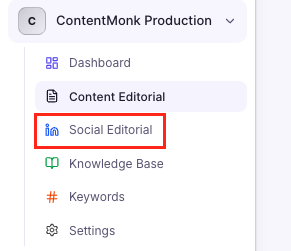
- Click on + New in the upper-right corner
- Now, choose your post styles (and quantity), and when it comes to source type, select Repurposing > Choose article. You can put some instructions if you want. Select all the author you want, and click generate (you can select 1,5,10 or more authors from your team).

- As you can see on the example above, I want to turn one article into 22 posts for 2 authors. Click on "Generate" and in less than one minute you'll have dozens of LinkedIn posts ready for publishing. The best part? ContentMonk automatically writes LInkedIn posts in each author's personal writing style.
- There's a neat calendar view so you can organize team's social publishing:

- Or you can edit the posts and add media files:

6. How to Use ChatGPT to Write Articles from Transcripts
Converting transcripts into articles with ChatGPT requires significant prep work before you even open the prompt window. The cleaner your input, the better your output-but there are hard limits to what ChatGPT can handle.
Step-by-Step Guide: Converting Transcripts to Articles
Step 1: Prepare your transcript. Use a transcription service like Otter.ai, Descript, or YouTube auto-captions to get a text transcript. Identify the main segments or topics discussed so you know where the valuable content lives.
Step 2: Define your article structure. Decide whether this transcript becomes one long article or multiple shorter pieces. What's the target audience and goal? Which parts of the conversation are most valuable? A 60-minute interview might have three great segments worth separate articles, or one central narrative worth developing into a comprehensive guide.
Step 3: Create a transcript conversion prompt. You need to be extremely specific about structure, tone, and editing requirements. Here's an example of the ChatGPT prompt we used to use:
Convert this podcast transcript into a 1,200-word how-to article.

Source transcript: [paste cleaned transcript].

Target audience: marketing managers learning about content distribution.

Article structure:

(1) Introduction explaining why content distribution matters more than creation,
(2) 5 main distribution channels with tactical advice for each,
(3) Common distribution mistakes to avoid,
(4) Conclusion with next steps. Tone: conversational but professional.

Remove conversational filler and false starts. Reorganize ideas for logical flow (the podcast jumped around).

Extract direct quotes where the speaker said something particularly insightful-preserve their voice for credibility. Add smooth transitions between sections.
Step 4: Review and improve. Verify quotes are accurate to the original transcript. Add context that podcast listeners had but article readers don't, such as:
- who the speaker is,
- why they're credible,
- what company they represent, etc.
Include specific examples or data mentioned in the conversation. Add formatting like headers and bullets for readability.
Step 5: Fact-check claims. Verify any statistics or claims made in the podcast before publishing in article form. Speakers sometimes misremember numbers or make claims that sound authoritative but don't hold up to scrutiny.
How to turn transcripts into articles in minutes with ContentMonk
- Upload transcript to Knowledge Base. Go to Knowledge Base > Upload.
- For usage scope choose "Manual Only" or "When Relevant" depending on your transcript type (i.e. if it's a transcript you would like to use ocasionally, then choose manual only and ContentMonk will get insights from it only when you manually call it. If you choose "When Relevant", ContentMonk might include insights from that transcript whenever they're relevant to the topic you're writing).
- Create your brief. Go to Content Editorial > Create Content. In the planning modal, add your instructions if you want, but make sure that you reference your transcript by typing "/":

- Add additional settings if you want (such as the author, primary and secondary keywords, content type, etc). When you're ready, click on "Generate Brief", and ContentMonk will write a brief based on your transcript and instructions.
- Edit the brief if needed. When you're ready, go to Generate Content and you'll see a full article in minutes.
7. How to Use ChatGPT to Create Content Briefs
You can create solid content briefs with ChatGPT if you're willing to do significant upfront work and accept that you'll copy-paste everything into your actual workflow afterward.
Step-by-Step Guide to Writing Content Briefs with ChatGPT
Start by gathering your brief requirements before touching ChatGPT.
Determine your target keyword and SEO goals, define your target audience as specifically as possible, identify the content objective (awareness, consideration, or decision stage), clarify your unique angle or point of view, list key competitors to analyze, outline required sections or topics to cover, set your word count target, and specify tone and style requirements.
Create a comprehensive brief prompt that includes all these details. Here's what used to work for us:
Create a detailed content brief for an article titled 'Email Marketing Automation for Ecommerce Brands.'

Brief requirements: Target keyword: 'email marketing automation for ecommerce.'

Target audience: ecommerce marketing managers at direct-to-consumer brands with $1M-$10M annual revenue, currently using basic email tools but experiencing scaling pains.

Objective: drive organic traffic and position us as the expert solution for sophisticated ecommerce email needs.

Unique angle: focus on advanced segmentation and behavioral triggers specific to ecommerce (cart abandonment, browse abandonment, post-purchase sequences) rather than generic automation advice.

Sections to include:

1. introduction with the business case,
2. core automation workflows every ecommerce brand needs,
3. advanced segmentation strategies,
4. integration with ecommerce platforms,
5. metrics that matter, and implementation roadmap.

Target word count: 2,000 words. Tone: expert but approachable - speak to experienced marketers, not beginners.

Include in the brief:

- content objective,
- target audience definition,
- main keyword and secondary keywords,
- unique POV, detailed outline with H2/H3 structure,
- key points to cover in each section,
- recommended examples or case studies,
- SEO metadata (title tag and meta description).
Review and refine the brief ChatGPT generates. Verify the outline flows logically, ensure your key differentiators are captured, and check that word count allocations make sense across sections.
How ContentMonk Perfects the Brief Workflow
ContentMonk's four-step process (Planning → Brief → Content → Finalize) makes briefs a standard workflow step instead of a disconnected task.
- Go to Content Editorial > click Create New > enter your headline and planning details (keywords, instructions, target audience), and click "Genereate Brief" to move to the Brief step.
- Now, ContentMonk will use your planning instructions plus workspace guidelines and all Knowledge Base documents to create a comprehensive brief automatically in 30-90 seconds (with your teams unique insights and secret knowledge).
- The system remembers your brand voice, style preferences, and content standards without you re-entering them every time.
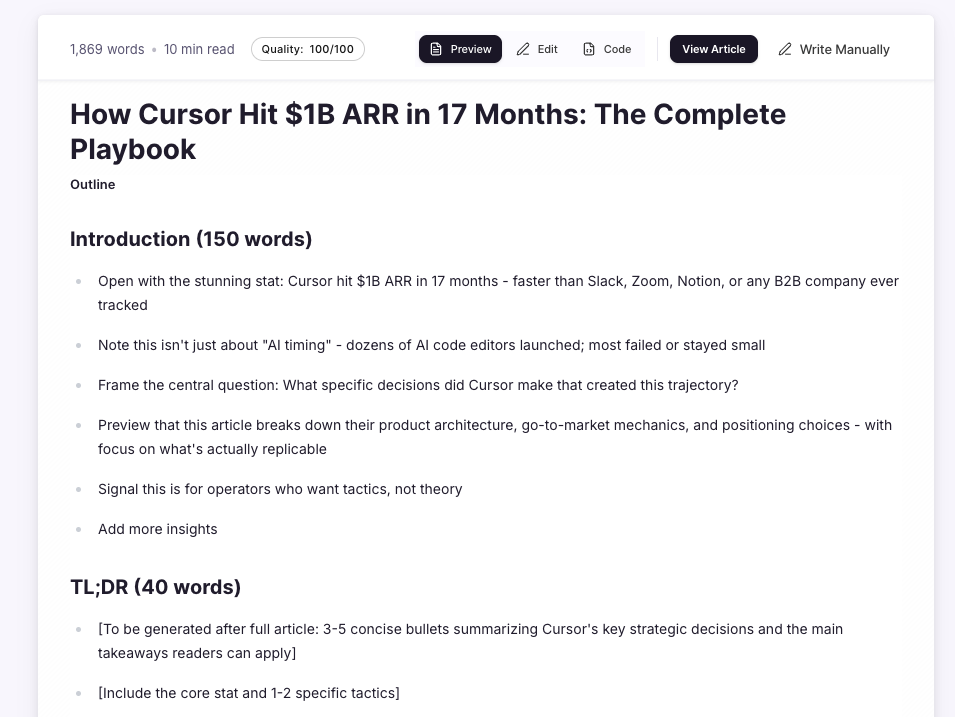
- You can now edit your brief inside the editor (without copy/pasting the text into Google Docs as you would need with ChatGPT). When you're ready, click on Generate Content and you'll have a final piece in less than 2 minutes.
8. How to Use ChatGPT to Write Landing Page Copy
Writing landing page copy with ChatGPT requires more precision than blog posts or articles.
You're optimizing for conversions, which means every section needs a specific job.
Give ChatGPT vague instructions and you'll spend hours rewriting the output. Give it a structured prompt with clear parameters and you'll get usable copy that needs minor tweaks instead of a complete rewrite.
Step-by-Step Guide to using ChatGPT to write Landing Page Copy
Step 1: Define your landing page specifics. Before you write a single prompt, answer four questions:
- What's the offer? Be specific: free trial, demo request, ebook download, webinar registration.
- What's the main traffic source? Google Ads visitors have different expectations than people coming from email or social media.
- What stage of awareness is your visitor? Problem-aware people need education about solutions. Solution-aware visitors are comparing options. Product-aware folks just need a reason to choose you.
- What's the main conversion goal, and are there secondary goals? Your primary CTA might be "Start Free Trial" while a secondary goal captures emails from people who aren't ready yet.
Step 2: Outline the required copy sections. Most landing pages include these elements:
- headline and subheadline that communicate the core benefit,
- a hero paragraph of 2-3 sentences that expands on the headline,
- benefit bullets with 3-5 points showing outcomes,
- a social proof section featuring testimonials, customer logos, or stats,
- feature highlights explaining what you offer,
- objection handling that addresses common concerns,
- CTA copy including button text plus supporting text above the button,
- and a closing statement that reinforces the value.
List these sections in your prompt so ChatGPT knows the complete structure you need.
Step 3: Create a detailed landing page copy prompt. Your prompt should specify every section with guidelines. Here's an example of what we used to use:
Write landing page copy for our project management software.

Offer: 14-day free trial.

Traffic source: Mostly Google Ads targeting 'project management tools.'

Visitor awareness: solution-aware (knows they need PM software, comparing options).

Sections needed:
1. Hero headline (8-10 words, focus on the main benefit of never missing deadlines),
2. Subheadline (15-20 words explaining how we solve deadline problems),
3. Opening paragraph (3 sentences on the pain of missed deadlines and unclear task ownership),
4. 5 benefit bullets emphasizing outcomes not features (frame as 'With [Product], you'll...' statements),
5. Feature highlight section with 3 core features (real-time updates, task dependencies, automated reminders) with 2-3 sentences each,
6. Objection handling for 'too expensive' and 'switching costs,'
7. CTA button text and supporting line above the button.

Tone: confident and direct, emphasize reliability and simplicity. Avoid hype words like 'revolutionary' or 'game-changing.'"
Step 4: Review for persuasion principles. After ChatGPT generates your copy, check that it follows a logical flow: - -
- problem, solution, proof, then action.
- Verify the benefits focus on outcomes rather than features (i.e. does "automated reminders" become "you'll never miss a deadline again"?).
- Confirm the CTA is clear and low-friction. "Start your free trial" works better than "Get started today" because it specifies what happens next.
- Check that objection handling actually addresses real concerns with specific answers, not platitudes.
9. How to Use ChatGPT to Write Newsletters
Writing newsletters with ChatGPT works if you're willing to document your entire newsletter structure, gather all the content pieces manually, and accept that you're starting fresh with every issue. Here's how we personally used to use ChatGPT for writing newsletters.
Step-by-Step guide to using ChatGPT for writing newsletter
Step 1: Define newsletter parameters:
- What's the newsletter goal? Nurture leads, engage customers, drive traffic, or build thought leadership?
- Who's the audience?
- What's the sending frequency?
- What's the typical format and structure?
Write all this down because you'll need to re-specify it every time.
Step 2: Gather content inputs. Collect everything before you start prompting. Depending on your newsletter structure, you'll need the main article or announcement to feature, 2-3 secondary content pieces or news items, any curated content like links to external articles, upcoming events or offers, and a clear CTA (what action do you want readers to take?).
Step 3: Create a newsletter writing prompt. Here's an example that actually works:
Write this week's newsletter for our ecommerce marketing audience (marketing managers at D2C brands).

Newsletter goal: drive engagement and position us as the go-to resource for ecommerce email marketing.

Structure:

- Subject line (8-10 words, intriguing but clear),
- preview text (40-50 characters that expands on subject),
- greeting (friendly but professional),
- main content block
- feature our new article 'Email Automation for Abandoned Carts' with 2-3 sentences on why it matters and a CTA to read the full article,
- quick hits section with 3 brief items: (1) interesting stat about cart abandonment rates from recent study, (2) tool recommendation
- highlight Klaviyo's new feature, (3) question of the week
- ask what their biggest deliverability challenge is, closing section with upcoming webinar announcement and registration CTA.

Tone: conversational and helpful like a knowledgeable colleague sharing insights. Include relevant emoji (sparingly - 1-2 total).

Keep total length under 300 words - respect their inbox.
Step 4: Review for engagement. Verify the subject line creates curiosity. Check that CTAs are clear and not overused (max 2 primary CTAs). Ensure the tone matches your brand.
How ContentMonk Handles Newsletters with Templates
ContentMonk has a handy little feature called "content types and templates", that allows you to create any content type you want. If that content type is following a strict structure over and over again (such as most of the newsletters), you can create a template.
This way, whenver you're using ContentMonk to write that content type, it will always follow a pre-defined structure.
- Create a "Newsletter" content type in Workspace Settings > Content Types with your standard structure (i.e. greeting, featured article, quick hits, closing).
- Every newsletter from now on will follow the same proven format automatically without re-specifying anything.
- Your Writing Style profile ensures every newsletter maintains your established tone. No need to re-specify "conversational but professional" each time you generate content.
- In your content editorial, just select the most recent articles you wrote with ContentMonk (that you wish to distribute in your newsletter), and click on Repurpose button on top of the table:

- In the modal that appears, select new content type (in this case that's Newsletter). Add instructions if needed, and click on Repurpose Content button:
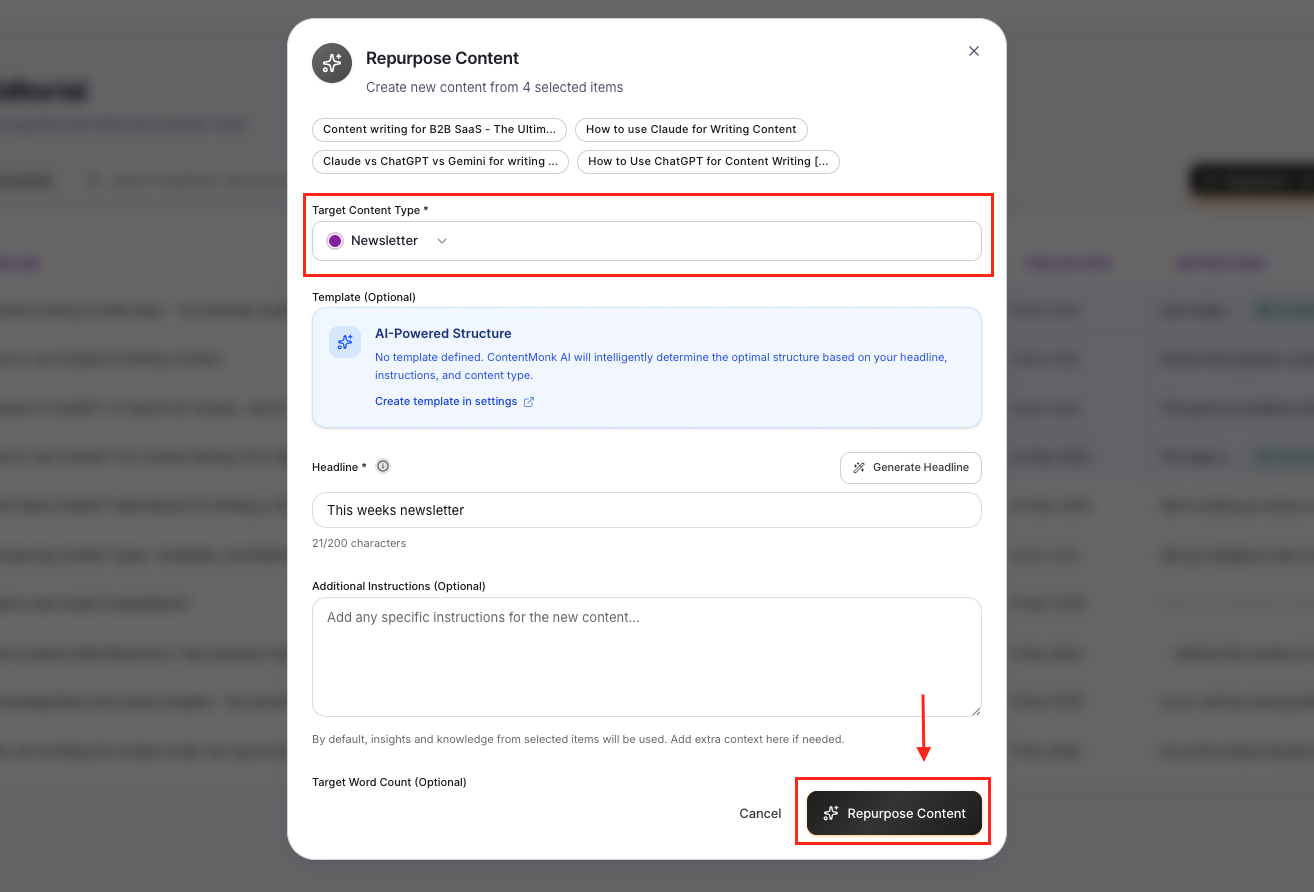
- And now, in less than 2 minutes, you'll get a complete newsletter based on your recently published articles
Pro Note: You can also repeat the same process for any other content types. I.e. you can in this way turn 5, 10 or more articles into ebook, lead magnet, etc. You can turn long-form content into guides, success stories, newsletters, or whatever you can imagine.
10. How to Use ChatGPT to Write Success Stories and Case Studies
Writing case studies with ChatGPT works if you're methodical about what information you provide and how you structure your prompt. The more specific you are, the less likely you'll get generic marketing fluff or invented details.
Step-by-Step Guide: Case Study Writing
Step 1: Gather case study information. Before you touch ChatGPT, collect everything you need:
- customer name and industry,
- the initial problem or challenge (be as specific as possible),
- why they chose your solution,
- implementation details including timeline, process, and team involved, specific results with quantifiable metrics like percentages, dollar amounts, or time saved,
- direct customer quotes from interviews,
- and any unique aspects of their story that make it memorable.
Step 2: Define case study structure:
- Decide on your format - you can write a story-driven narrative, use a problem-solution-results framework, or structure it as a Q&A interview style.
- Determine your target audience (prospects in a similar situation) and your goal (demonstrate a specific use case or ROI).
This clarity shapes how ChatGPT approaches the writing.
Step 3: Create a case study writing prompt. This is where specificity pays off. Here's an example that works for us:/
Write a customer success story for our project management software.

Customer: TechFlow Creative, a 35-person digital marketing agency.

Problem: Before using our product, they managed projects through a combination of spreadsheets, Slack threads, and email, leading to missed deadlines (20% of projects delivered late),
unclear task ownership (account managers spent 5+ hours weekly clarifying who owned what), and client dissatisfaction (NPS score of 32).


Solution: Implemented our PM software across all client projects in June 2025, used task dependencies and automated reminders as core features, integrated with Slack for notifications.

Results: Project on-time delivery improved to 97%, account managers save 10 hours per week on task clarification, client NPS score increased to 68 within 3 months, agency took on 15% more clients without hiring.

Include quotes from Sarah Martinez, Operations Director: 'The task dependency view alone saved us countless hours of manual coordination' and 'Our clients now tell us we're the most organized agency they work with.'

Structure:

- Compelling headline with customer name and specific result,
- introduction paragraph with industry context,
- 'The Challenge' section (3-4 paragraphs detailing their pain points),
- 'The Solution' section (2-3 paragraphs on why they chose us and implementation),
- 'The Results' section (metrics and outcomes), pull quote from customer, closing paragraph with their future plans.

Tone: professional but warm, focus on specific details not generic benefits.

Target length: 1,000-1,200 words.
How to write success stories and case studies in less than 2 minutes with ContentMonk
ContentMonk lets you create a "Case Study" or "Success Story" content type template with your standard structure. Go to Workspace Settings, then Content Types, and configure your proven case study format once. By default, the template will follow the 'Problem > Solution > Results" framework. You can change it if you want.
Here's how to create success stories/case studies with ContentMonk in minutes:
- Upload your customer interview trasncript in knowledge base
- Create new content item inside editorial
- Select "Success Story" as your template (or however you called it inside settings)
- In the instructions field, just tag your document from a knowledge base with a transcript
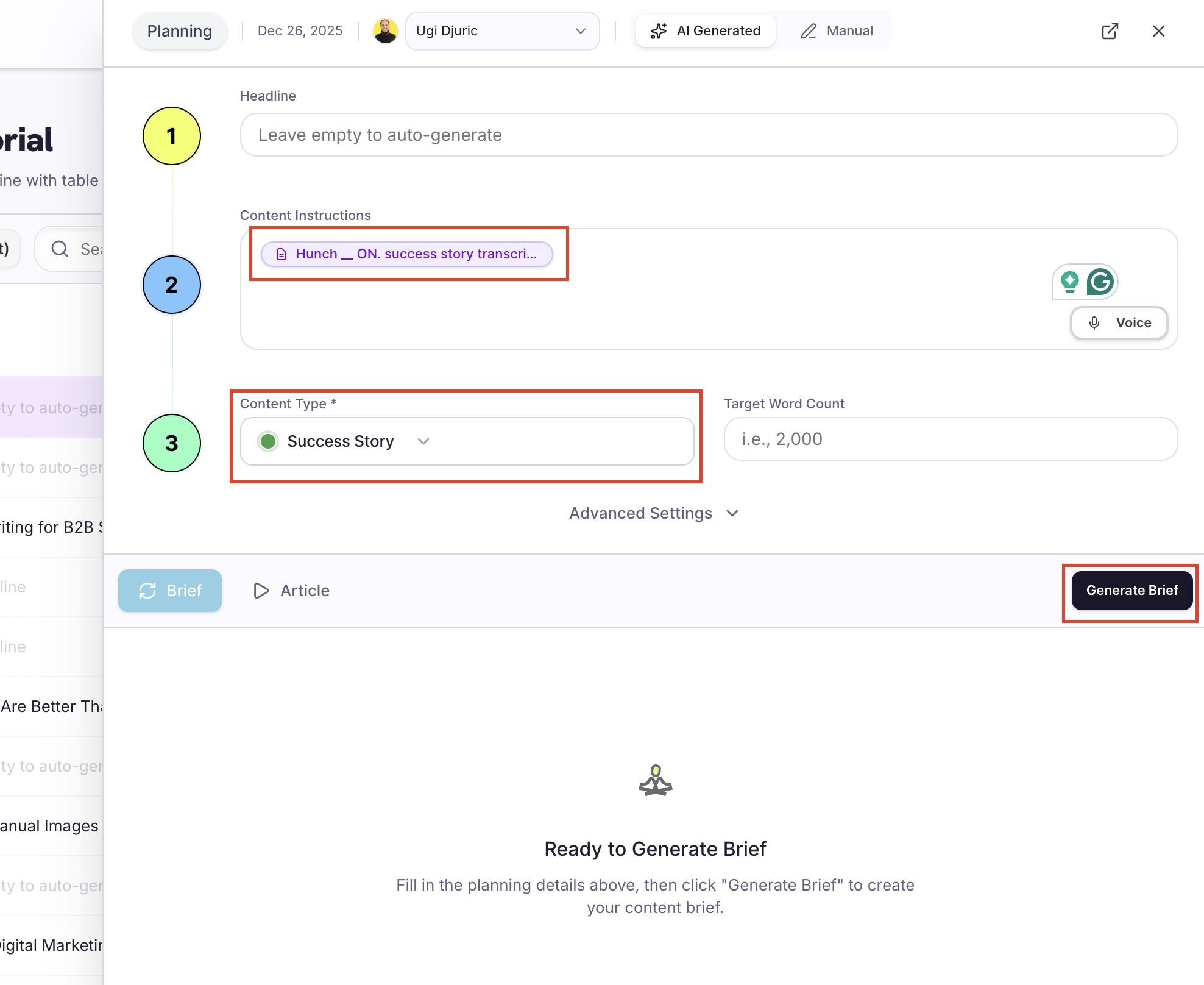
- No other info needed, just click on the Generate Brief button
- In a minute, you'll get a success story brief. Satisfied? Click on Generate Content and you're ready to go!
11. How to Use ChatGPT to Write Ebooks and Lead Magnets
Writing ebooks with ChatGPT requires breaking your project into manageable chunks and providing detailed instructions at every stage. You can't just ask for "a 5,000-word ebook on email marketing" and expect something publishable.
Step-by-Step guide to using ChatGPT to write ebooks and Lead Magnets
Step 1: Plan ebook structure and goals. Define your ebook topic and target audience, lead generation goal (what subscriber information are you capturing?), main argument or framework you're presenting, and target length.
Typical lead magnet ebooks run 3,000-8,000 words. Map out your chapter breakdown (usually 5-8 chapters) and establish tone and style (educational, authoritative, conversational, or some combination)
Step 2: Create detailed ebook outline. For each chapter, define the chapter title and main point, 3-5 key concepts or sections, examples or case studies to include, transitions between chapters, and calls-to-action. Weave soft CTAs to your product or service throughout rather than saving everything for the end.
Step 3: Write ebook chapter-by-chapter. Create separate prompts for each chapter to maintain quality and manageability. ChatGPT performs better on focused 800-1,200 word sections than trying to generate 5,000+ words at once.
Here's the example chapter prompt we like to use:
Write Chapter 3 of an ebook titled 'Email Marketing Automation for Ecommerce.'

Chapter title: 'Building Your First Automated Workflow.'

Context: This ebook teaches ecommerce marketing managers how to implement email automation.
Previous chapters covered strategy and data setup. This chapter is the hands-on implementation guide.

Chapter 3 structure:
1. Introduction (explain why we're starting with a welcome series-it's the foundation for all automation),
2. Section 1: Define your welcome series goals (brand introduction, set expectations, drive first purchase-200 words),
3. Section 2: Map the welcome series flow (5-7 emails over 14 days with detailed descriptions of each email's purpose and content-350 words),
4. Section 3: Write your first email (step-by-step guide with examples-250 words),
5. Section 4: Test before launching (QA checklist-150 words),
6. Chapter summary (key takeaways and transition to Chapter 4 on cart abandonment-100 words).

Tone: authoritative but encouraging, like a skilled mentor. Include 2-3 specific examples.

Target length: 1,050 words."
Step 4: Compile and format. Combine all chapters into a single document, add introduction and conclusion chapters, include a table of contents, insert graphics and charts (create separately), and format for readability with short paragraphs, subheadings, and bullet lists.
Step 5: Edit for consistency. Ensure consistent tone across all chapters, verify transitions between chapters flow smoothly, and add cohesive branding elements throughout.
Create the entire 10.000+ word ebook in ContentMonk in minutes
Instead of going back-and-forth with ChatGPT for hours trying to write a perfect ebook and then editing it for another 2-3 hours, you can create entire ebook (no matter how long) with ContentMonk in minutes.
- Select all the previous blog posts you want to use as insights for the ebook
- Click on the Repurpose button in the top-right corner of the table
- Choose "Ebook" as your Content Type, add additional instructions if you want, and click on the Repurpose Content button:
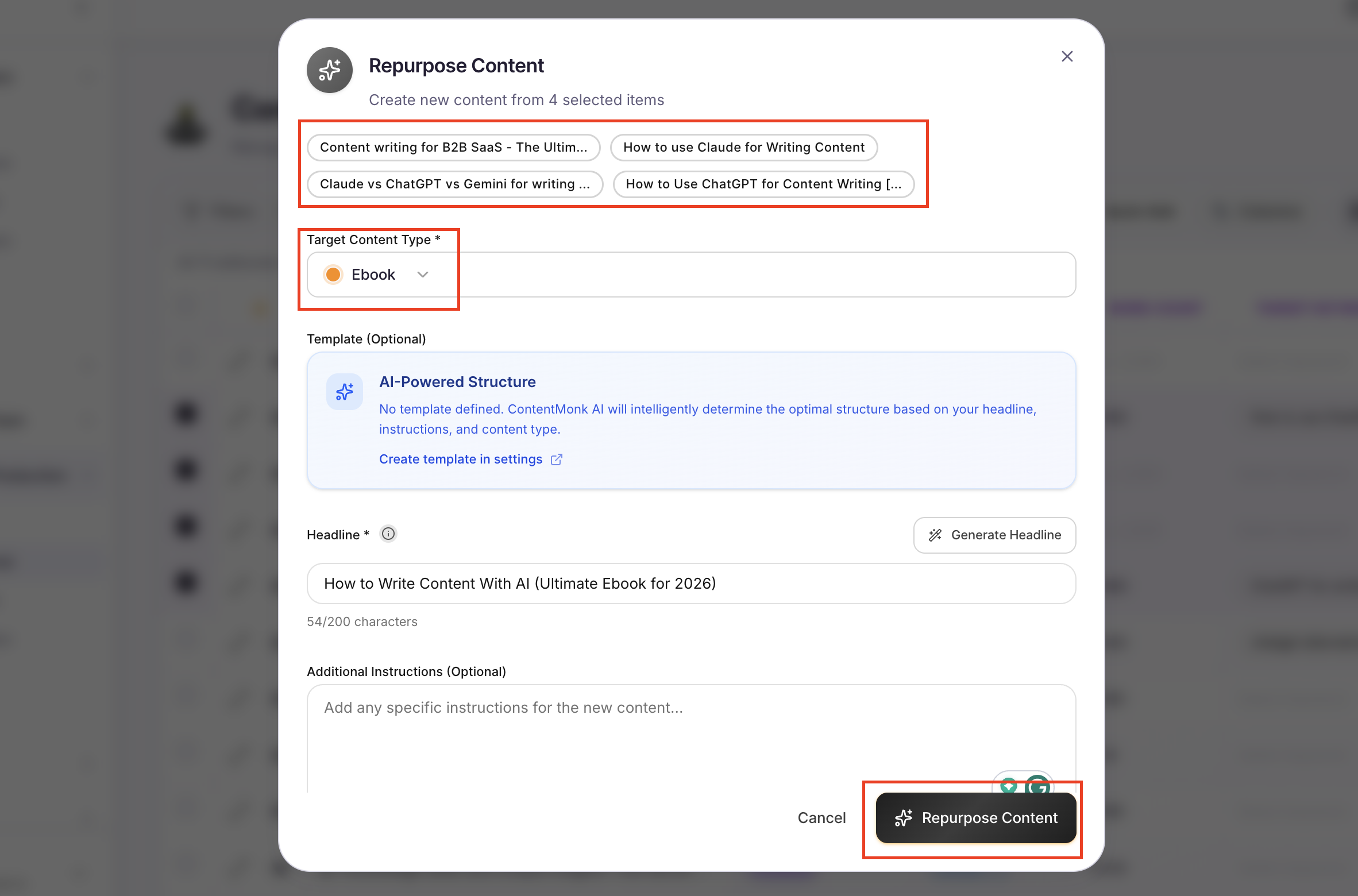
In a few minutes, you'll get a brief for your ebook. Edit/add specific insights where relevant, and click on Generate Content button to get your ebook in minutes.
12. How to Use ChatGPT to Write Ad Copy
Writing ad copy with ChatGPT requires extreme specificity in your prompt because every platform has different character limits, and you need multiple variations that actually test different messaging angles.
Miss one detail and you'll get ads that don't fit or headlines that all say the same thing in slightly different words.
Step-by-Step Guide to using ChatGPT for writing Ad Copywriting
Step 1: Define your ad campaign specifics. Before you write a single word, identify exactly what you're creating:
- Start with your ad platform: Google Search, Facebook, LinkedIn, Instagram, or display networks. Each has different formats and character limits.
- Specify your ad format: search text ad, social image ad, video ad script, or display banner copy.
- Define your campaign objective clearly: awareness, traffic, lead generation, or sales.
- Document your target audience in detail including demographics, specific pain points, and their stage of awareness (problem-aware, solution-aware, or product-aware).
- Clarify your offer or core message. Most importantly, note the character limits for your specific platform (i.e. Google Responsive Search Ads need headlines at 30 characters maximum and descriptions at 90 characters, while Facebook ads have different constraints)
Step 2: Gather your creative requirements:
- Collect the marketing details that make your ads work.
- Identify the unique selling proposition you want to emphasize.
- Decide which key benefit should lead your messaging.
- Document any promotional offer details including pricing, discounts, or trial periods.
- Include required legal disclaimers or brand terms that must appear in every ad.
- Pull in your existing brand copy guidelines so the ads match your voice.
Step 3: Create your ad copy prompt with variations. Write a detailed prompt that specifies exactly what you need. Here's an example that we used to use:
Write Google Search ad copy for our project management software targeting 'project management software for agencies.'

Campaign goal: drive free trial signups.

Target audience: agency owners and operations managers at 15-50 person digital marketing agencies frustrated with missed client deadlines and unclear task ownership.

Ad format: Google Responsive Search Ad.

Required components:
- 15 headlines (max 30 characters each - variety of angles),
- 4 descriptions (max 90 characters each).

Headlines should include:

- 3 focused on the main benefit (never miss deadlines),
- 3 focused on agency-specific pain points (client happiness, team coordination),
- 3 focused on ease of use (setup in minutes, no training needed),
- 3 focused on outcomes (take on more clients, reduce chaos),
- 3 with the offer (14-day free trial, no credit card).

Descriptions should address: what we do, who we're for, why we're different from basic PM tools, and CTA with offer.

Include our keyword naturally where it fits.

Tone: confident and direct. Avoid hype words. No exclamation points.
Step 4: Test multiple variations. Review the generated headlines and descriptions. Select the most distinct options to maximize Google's automated testing capability.
If three headlines all say "Never miss a deadline" with slightly different wording, they're not actually testing different angles. Review every headline and description for character limits and make sure they comply with platform advertising policies.
The Bottom Line: Choose the Right Tool for Your Content Workflow
ChatGPT is a powerful writing tool when you use specific, context-rich prompts. It's excellent for ideation, overcoming blank page paralysis, generating first drafts when you provide detailed instructions, and one-off copy projects. But it's designed as a general-purpose AI, not a content writing tool.
When you're creating 10+ pieces of content monthly, the limitations add up fast. You're:
- repeating brand context in every prompt,
- manually juggling workflow between research,
- brief, writing, and editing.
- Context window constraints make long-form content a multi-prompt nightmare.
- There's no content library or organization.
- You'll quickly find yourself spending too much time copy/pasting content from one place to another.
ContentMonk was built specifically to solve these problems, and make your writing faster, easier, and better.
Unlike ChatGPT, ContentMonk maintains your brand context and insights permanently through Knowledge Base and Writing Style profile.
It follows a structured workflow (Planning → Brief → Content → Finalize) that ensures consistent quality.
It generates long-form content without context loss, stores all content in an organized library with calendar planning, you can edit ContentMonk-generated content diretly inside the product (with our AI-editing-power-ups), and repurposes content with one click.
You don't have to choose one or the other. Use both tools strategically: ChatGPT for quick one-off projects and ideation, ContentMonk for your core content production workflow.
Start your 14-day free trial of ContentMonk to see how much faster content creation becomes when you're using purpose-built workflows instead of reinventing prompts every time. No credit card required.
FAQ: ChatGPT for Content Writing
Can ChatGPT write an entire article for me without editing?
Short answer: No. ChatGPT should not be used to generate publish-ready content without human review and editing.
ChatGPT can produce grammatically correct and well-structured first drafts, but they lack specific examples from your experience, original insights that differentiate your content, verified facts and statistics (hallucination risk is real), natural brand voice without extensive prompting, and strategic SEO optimization beyond keyword insertion.
The best practice is using ChatGPT to generate the structure and first draft, which saves 60-70% of writing time. Then add your expertise through specific examples, verify all factual claims, inject unique perspective or data, refine for brand voice, and optimize for SEO and readability. The reality check: the best content comes from AI-assisted writing, not AI-generated writing.
How long should my ChatGPT prompts be for best results?
The short answer is: the more the better, but keep an eye on too long prompts because of ChatGPT's context loss.
Always include target audience description (who they are, their pain points, expertise level), content goal (awareness, education, conversion), tone and style requirements (conversational, authoritative, friendly), structure requirements (sections, word count, format), specific angle or unique perspective, context about your brand or product, and examples of what to avoid.
Use longer prompts (300-500 words with detailed outlines) when working on complex content like articles, ebooks, case studies, or highly technical topics. Shorter prompts (50-100 words) work fine for simple tasks like headline variations, social media posts, or email subject lines. Pro tip: save your best prompts as templates to reuse and refine over time.
Will Google penalize AI-generated content?
Google's official position is clear: they don't penalize content solely because it's AI-generated. They evaluate based on E-E-A-T (Experience, Expertise, Authoritativeness, Trustworthiness) and helpfulness to users.
The real risk is publishing generic AI content without editing, adding unique value, or fact-checking. This will result in poor rankings because it lacks the signals Google looks for.
To use AI safely, generate drafts with ChatGPT, then add original examples and data, include expert insights from your experience, cite verifiable sources, match search intent thoroughly, and optimize for user experience not just keywords. Bottom line: AI is a tool in your content process, not a replacement for expertise and editorial oversight. Content that helps users ranks regardless of how it was created.
What are the biggest mistakes when using ChatGPT for content?
Mistake 1: Vague prompts. Asking "write a blog about X" produces generic content. Always provide detailed context, audience, structure, and tone requirements.
Mistake 2: Copy-pasting without editing. Treating ChatGPT output as finished work results in generic, unbranded content that lacks unique value.
Mistake 3: Not fact-checking. ChatGPT invents convincing-sounding statistics and sources. Verify every factual claim before publishing.
Mistake 4: Ignoring context limits. Trying to generate very long content (3,000+ words) in one prompt produces lower quality. Break into sections or use purpose-built tools.
Mistake 5: No brand voice input. Expecting ChatGPT to inherently know your brand tone results in generic corporate speak. Always specify tone with examples.
How is ContentMonk different from using ChatGPT for content?
The core difference: ChatGPT is a general-purpose AI conversational tool, while ContentMonk is a purpose-built content production platform with AI integrated into a structured workflow.
ContentMonk guides you through Planning → Brief → Content → Finalize steps, ensuring consistent quality and completeness. ChatGPT requires you to build your own process from scratch every time.
For context retention, ContentMonk maintains your brand guidelines, writing style, and research documents in Knowledge Base permanently. ChatGPT requires repeating context in every prompt, which wastes time and produces inconsistent results.
ContentMonk stores all content in an organized library with calendar planning, team collaboration, and version control. ChatGPT conversations disappear unless manually saved.
The platform offers specialized features and purpose-built workflows for SERP research, content briefs, LinkedIn repurposing, and multi-step article generation that maintain context throughout the entire process-something ChatGPT can't do without constant manual intervention
